This week is about doing less typing. You’ll learn how one small file can replace every long SSH command you type. There’s also a Docker Compose trick that keeps your custom changes safe from updates, and a Bash history tip that saves you retyping long paths.
🗄️ One file for every server
If you look after more than a couple of servers, you probably type things like this many times a day:
ssh -p 2222 -i ~/.ssh/id_ed25519 [email protected]You don’t need to. SSH reads ~/.ssh/config before every connection. Save the details there once and give each server a short name:
Host web
    HostName 203.0.113.10
    User abhishek
    Port 2222
    IdentityFile ~/.ssh/id_ed25519

Host db
    HostName 10.0.0.5
    User admin
    ProxyJump web

Host *
    ServerAliveInterval 60
    ServerAliveCountMax 3
Now ssh web is enough. The db entry goes further. That database server sits on a private network, and ProxyJump sends you through web to reach it. You type ssh db and SSH does both hops for you.
The Host * block sets defaults for every server. Here it keeps idle sessions alive, so a quiet terminal doesn’t freeze with a “broken pipe” error. SSH uses the first value it finds for each option, so keep this catch-all block at the bottom of the file.
The aliases work with other tools as well. scp backup.tar.gz web:/tmp/ and rsync -av site/ web:/var/www/ both understand them. Keep the file private with chmod 600 ~/.ssh/config. SSH refuses to use it if other users can write to it.
The SSH config file guide covers more options, including how to override a profile for a single connection. Once your aliases work, try SSH tunneling to reach services that aren’t open to the internet.
New to SSH? The free SSH Fundamentals course walks you through key-based login and securing your server.
🐳 DevOps corner: override, don’t edit
Many self-hosted apps ship a compose.yml that gets replaced every time you update. If you change it directly, your next git pull fails with “local changes would be overwritten”.
Put your changes in a compose.override.yml next to it:
services:
  ghost:
    logging:
      driver: json-file
      options:
        max-size: "10m"
        max-file: "3"
Docker Compose merges this file in automatically when you run docker compose up. The upstream file stays as it is, so updates go through cleanly. Run docker compose config to see the merged result before you restart anything.
I explain the full setup, with log rotation, in how Docker Compose override fixed my Ghost server.
By the way, if you used Watchtower for automatic updates, here are some alternatives that still work.
💡 Quick terminal tip
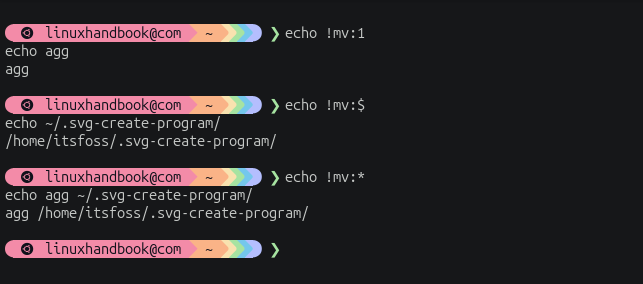
The !! repeats the previous command, but Bash can also reuse the arguments from past commands.
Use !command:1, !command:$, and !command:* to retrieve the first, last, or all arguments from the previous command.
📦 Self-hosting: SnapOtter
SnapOtter is a self-hosted file-processing platform that helps you stop relying on dozens of online converters and utilities. From OCR and transcription to format conversion and PDF editing, it keeps file processing private by running everything on infrastructure you control.


Self-host easily with PikaPods. Get $5 free welcome credit to test out their service.


🛠️ Tool discovery: Noodle
Noodle is an open-source terminal REST client that lets you write, send, inspect, and automate HTTP requests from readable files. By keeping request collections versioned alongside the code they exercise, it bridges interactive API exploration, automation, and coding-agent workflows from a single workspace.

📰 Linux news that matters
- Anthropic used Claude to generate formal proofs for 123 OSS-Fuzz libraries, discovering bugs that years of fuzz testing had missed and demonstrating that AI could help make large-scale formal verification practical for software security.
- AWS Lambda Web Functions allow developers to deploy standard Node.js web applications and frameworks directly on Lambda with concurrent request handling, response streaming, and built-in global routing, removing the need for adapters and much of the traditional HTTP infrastructure.
- Amazon is discouraging "tokenmaxxing" and warning engineers not to use AI excessively just to boost productivity metrics. The company says software quality, customer outcomes, and business impact are better measures of success than token consumption or AI adoption rates.
- Cisco has open-sourced Project Quarry, a security framework that detects suspicious AI agent behavior by analyzing entire action sequences rather than isolated events.
- Gregory Kurtzer, creator of Rocky Linux, unveiled Ginux, a Rust-based kernel that can boot Rocky Linux userspace while remaining independent of the Linux kernel itself.
- Tesco is reportedly planning to migrate store infrastructure from VMware to Proxmox, adding another high-profile enterprise to the growing list evaluating open-source virtualization alternatives.
😂 Geek humor

💌 Keep on loving Linux Handbook
The AWS video course is in post-production.
Become a Pro member · Browse courses · eBooks
Missed the previous editions? You can access the newsletter archives.
I like reading your messages, so just hit reply and tell me how you are enjoying Linux 😄