If editing your docker-compose.yml directly is breaking git pull from upstream, here's the fix: move your customizations into a separate compose.override.yml file instead of editing the original.
The fix: use a compose override file
Create a compose.override.yml in the same folder as your compose.yml, and use the exact service names from your original file (ghost and caddy, in my case).
services:
  ghost:
    logging:
      driver: json-file
      options:
        max-size: "100m"
        max-file: "5"
  caddy:
    logging:
      driver: json-file
      options:
        max-size: "100m"
        max-file: "5"
Docker Compose picks up compose.override.yml automatically and merges it into compose.yml at runtime, so you don't need to pass any extra flags.
So, when you run:
docker compose upIt is equivalent to running:
docker compose -f compose.yml -f compose.override.yml upYour original compose.yml never gets touched, so there's nothing left for git pull to conflict with and so no complaints from git.
How I ran into this
I run my Ghost sites using Ghost's official Docker Compose self-hosting method. Eventually, I noticed that Ghost's default setup generates a lot of log output, so I added log rotate option in the docker compose file for the ghost and caddy services directly inside compose.yml.
This solved the logs eating up disk space problem, but updating the Ghost version became inconvenient.
Updating to a newer Ghost version after that is meant to be a simple three-step routine:
- git pull
- docker compose pull
- docker compose up -d.
That routine broke because I modified compose.yml. Every git pull started failing with the same error:
root@ghost-learnubuntu:/opt/ghost# git pull
remote: Enumerating objects: 89, done.
remote: Counting objects: 100% (68/68), done.
remote: Compressing objects: 100% (46/46), done.
remote: Total 89 (delta 52), reused 29 (delta 20), pack-reused 21 (from 2)
Unpacking objects: 100% (89/89), 31.28 KiB | 485.00 KiB/s, done.
From https://github.com/TryGhost/ghost-docker
   14cc722..d3204b2  main                                   -> origin/main
Updating 14cc722..d3204b2
error: Your local changes to the following files would be overwritten by merge:
        compose.yml
Please commit your changes or stash them before you merge.
Aborting
For a while, my workaround was keeping a backup of the untouched compose.yml, or running git stash before every pull. It worked, but it meant remembering an extra step every single time I wanted to update Ghost.
And one day, I came across the concept of compose override file.
What is a compose override file
A compose override file is just a second compose file that sits next to your main one. Anything you define inside it gets layered on top of compose.yml automatically, without you having to pass any extra flags to docker compose.
Since it's a separate file, it's not the one git is tracking against upstream, so pulling new changes from Ghost's repo doesn't touch anything you've customized.
compose.yml exactly, Docker Compose treats it as a new service instead of merging into the existing one.Here's the compose.override.yml file for my Ghost.
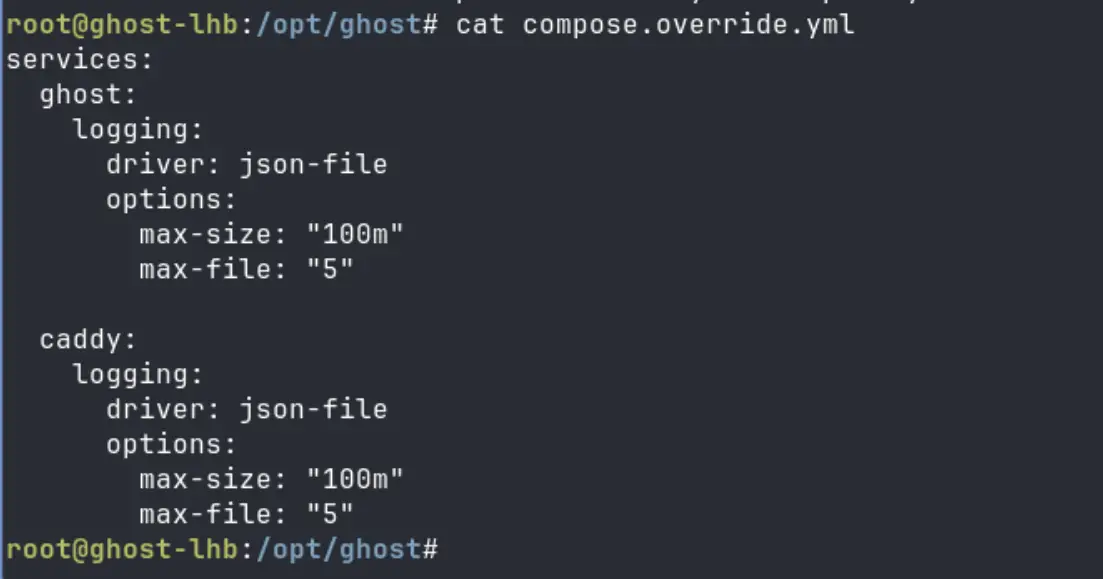
This solved the problem for me completely. My compose.yml now stays exactly as it comes from upstream, and git pull, docker compose pull, docker compose up -d goes back to being a clean three-step routine.
Using override files to separate test and production
The same mechanism works for more than just logging. Since an override file just layers extra configuration on top of the base file, you can use a similar setup to separate test and production: keep one compose.override.yml for local tweaks like lighter resource limits or different ports, and a separate file, say compose.prod.yml, for anything specific to production. You pick which one applies at deploy time with the -f flag.
Other ways to use override files
Let's see various ways you can use the overrride compose file.
Run without override
If you ever need to deploy without applying the override, point docker compose at only the base file explicitly:
docker compose -f compose.yml up -d
Passing -f like this skips the automatic override merge entirely.
Use multiple override files
You're also not limited to one override file. Layer as many as you need by repeating -f in order, with later files taking priority over earlier ones:
docker compose -f compose.yml -f compose.override.yml -f compose.prod.yml up -d
See what the final compose file looks like
Whenever you want to double check what's actually being applied after all that layering, run:
docker compose config It prints the fully merged result.
💡Add override to gitignore
I have added my compose.override.yml to the .gitignore. It's local to my setup, not something upstream needs to know about, and keeping it out of git means I'll never run into a merge conflict over it either. You can do the same if it fits your scenario.
I'm sure there's more you can do with override files depending on your setup, but this fixed the problem I had: keeping my logging tweaks out of the file Ghost's repo manages.
If you're running Ghost, or anything else, through docker compose and editing the compose file directly, it's worth switching to an override file before you reach for git stash every time.