Chapter 4: Build a Personal AI Agent with n8n
Learn how to build an autonomous Personal AI Assistant using n8n and Google Gemini Pro. Connect your assistant to Discord, Canva, Gmail, Google Drive, Wikipedia, and a Calculator tool for dynamic multi-tool automation.
In the previous chapter, we built our first workflow: a structured feedback tracker that followed a predetermined path from form trigger to AI extraction to database storage. Every execution followed the exact same sequence of steps. That linear approach is perfect when your process is fixed and predictable.
However, modern personal productivity rarely follows a rigid linear path. In your daily work, you might want to ask a question, request a quick calculation, search through project documentation in Google Drive, pull up recent email threads from Gmail, generate visual design assets in Canva, or broadcast an announcement across your Discord server. Building a dedicated, fixed workflow for every single permutation of these tasks would result in dozens of fragile, disconnected automations.
This is where AI Agents transform the paradigm. Instead of a developer hardcoding every branch in advance, an AI Agent uses an advanced Large Language Model (LLM)—in our case, Google Gemini Pro—as a reasoning engine. When you send an instruction from Discord, the agent evaluates your prompt, inspects its available connected tools, autonomously decides which tools are needed, executes them in the correct sequence, and reports the finalized result back to your Discord channel.
In this chapter, you will build an end-to-end, multi-tool Personal AI Assistant with n8n. You will connect Discord as your command interface, configure Google Gemini Pro as the brain, attach Conversation Memory so the assistant remembers context across messages, and equip it with six powerful tools covering your entire digital workspace: Canva, Gmail, Google Drive, Discord Actions, Wikipedia Knowledge, and a Calculator & Resource Sizer.
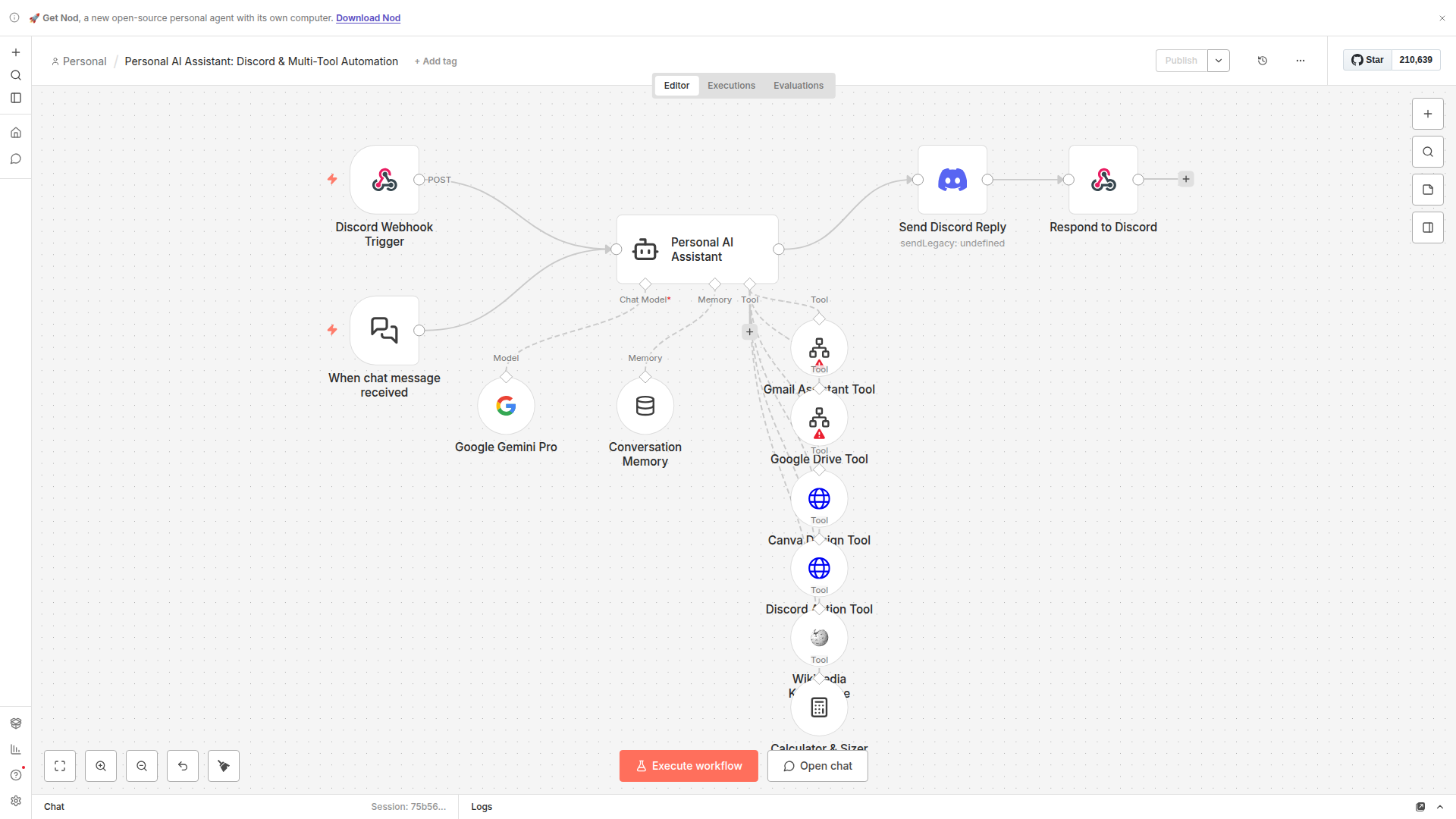
How an AI Agent Differs From a Standard Workflow
To design agentic systems effectively, you need to understand the fundamental distinction between a traditional workflow and an AI agent.
In a standard automation workflow (such as our Chapter 3 feedback processor), the human developer makes all the routing decisions at build time. If you receive data at Node A, it always travels through Connection 1 to Node B, then through Connection 2 to Node C. If there is branching, you must manually write conditional If or Switch statements with explicit boolean expressions.
In contrast, an AI Agent operates on an autonomous reasoning loop, commonly known in computer science as the ReAct (Reasoning + Acting) pattern. The agent workflow proceeds through four distinct stages on every incoming message:
- Perception (Ingestion): The agent receives the user's natural language instruction via Discord or the chat trigger.
- Reasoning (Cognition): The agent passes the user's prompt, along with the descriptions of all connected tools and past conversation history, to the Google Gemini Pro model. Gemini analyzes the intent: Does this request require searching Drive? Does it require arithmetic? Can it be answered directly?
- Action (Tool Execution): If the model determines that external information or an external action is needed, it pauses text generation and outputs a structured tool call (specifying the exact tool name and input parameters). n8n executes that tool and returns the resulting raw data back into the model's context window.
- Synthesis & Response: The model evaluates the tool's output, verifies whether the user's request has been fully satisfied (or if another tool call is necessary), synthesizes a coherent, formatted answer in Discord markdown, and transmits it back to the channel.
Because the language model directs the process, the same workflow can answer a simple greeting directly, perform complex server RAM calculations, locate a project file in Google Drive, or query Canva for a thumbnail design—all without a single manual Switch node.