I was skeptical about AI tools in a DevOps workflow for a long time. Every demo I saw showed someone asking AI Agent to write a Hello World Dockerfile. That's not a DevOps use case, that's a simple chat.
What changed my mind was using Claude for things that actually slow me down at work. Not boilerplate code generation, but the genuinely tedious parts of the job: interpreting a cryptic error from a stack trace buried inside a Kubernetes pod, converting a Bash script someone wrote in 2017 into something readable, or asking "what does this flag do again" without having to leave the terminal context I'm already in.
But here's the thing: generic Claude and skilled Claude are two very different tools.
Out of the box, Claude gives you general-purpose answers. When you add a SKILL.md, a structured instruction file that tells Claude exactly how to approach a specific task, you get a focused, deterministic workflow instead of a guess. The difference matters in DevOps, where a half-correct answer about a Kubernetes misconfiguration or a Terraform plan can cause real problems.
This article covers both sides: the skills themselves, and the concrete difference between using Claude with and without them. I'm running this on VS Code with Claude Sonnet 4.6.
What Are Claude Skills?
Claude Code supports a feature called skills: markdown files named SKILL.md that live inside a .claude/skills/ directory in your project. When you ask Claude something that matches a skill's trigger phrases, it automatically uses the structured workflow defined in that file instead of its default behavior.
Think of it like the difference between asking a new colleague a question and asking someone who's already written the runbook for it. Same knowledge, completely different depth and reliability.
I've written 8 of my own, one for each workflow I find myself using regularly.
Why Skills Actually Matter
Let me show the difference concretely before going through each skill.
I'll use the error-decoder skill as the example, with a Docker container that keeps exiting. This is something you can reproduce on any machine with Docker installed.
The prompt: "My Docker container keeps exiting immediately. Here's the output." (with docker logs and docker inspect output pasted in)
Here's what I actually pasted in:
$ docker run --name my-app myrepo/my-app:2.1.0
Error: DATABASE_URL environment variable is not set.
Exiting.

$ docker inspect my-app --format='{{.State.ExitCode}} {{.State.OOMKilled}}'
1 false

$ docker ps -a | grep my-app
my-app   myrepo/my-app:2.1.0   Exited (1) 3 seconds ago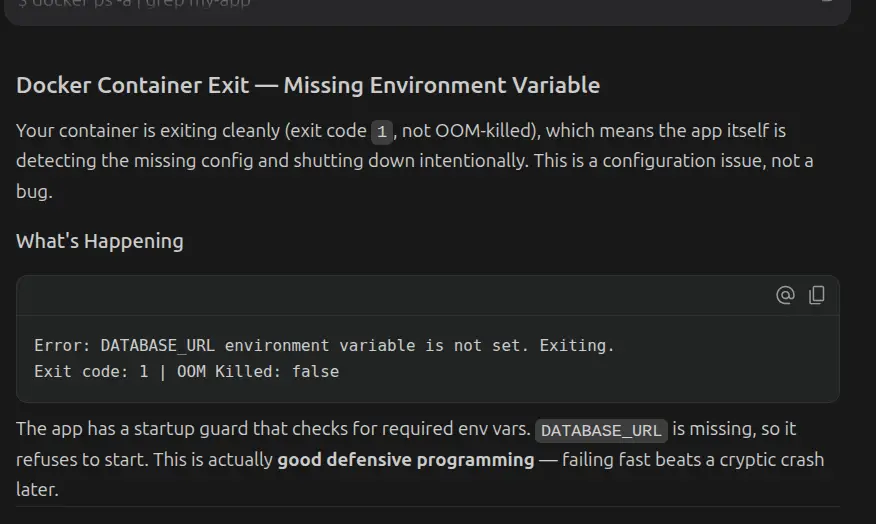
The response is accurate but completely generic. It lists common causes without engaging with the actual output that was pasted. The real answer is sitting right there in the logs (DATABASE_URL environment variable is not set) but Claude, without the skill, doesn't structure its analysis to find it.
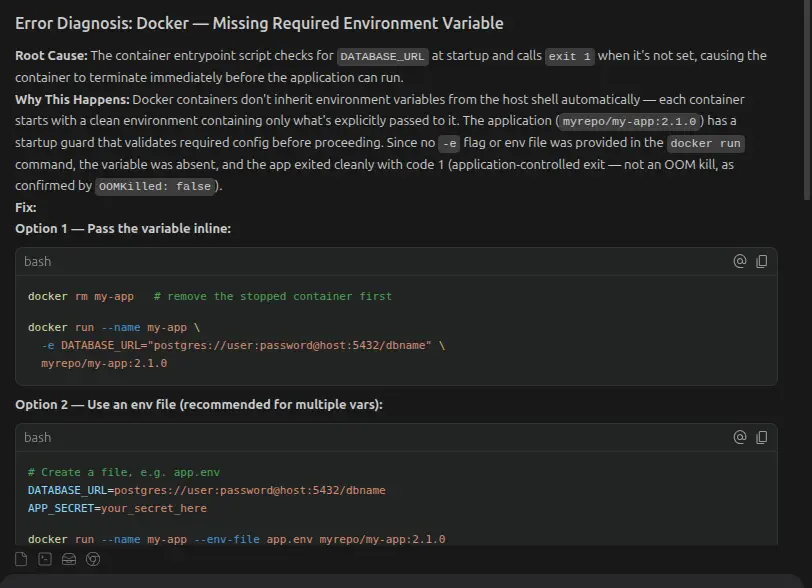
The response now follows the skill's output format. It pulls the specific root cause directly from the logs, gives the exact fix command, tells you what a successful run looks like, and gives the next diagnostic step if it still fails.
The skill didn't add knowledge Claude didn't have. It added structure and focus, it forces Claude to identify the root cause separately from the proximate cause, and to give a verification step instead of stopping at "here's the fix."
The 8 Claude Skills in My Toolbox
Below are the 8 skills you will have in your project, which will give you a focused and structured workflow for your projects. I will also show you the results I get after the prompt I give to the agent with the skills enforced. You are free to download them and modify them as per your requirements.
The skills folder structure will look like this:
.claude/
└── skills/
├── error-decoder/
│ └── SKILL.md ← Diagnose Kubernetes, Terraform, Helm errors
├── bash-auditor/
│ └── SKILL.md ← Write and audit Bash scripts
├── k8s-manifest-reviewer/
│ └── SKILL.md ← Explain and audit Kubernetes YAML
├── format-converter/
│ └── SKILL.md ← Convert between DevOps formats and tools
├── runbook-drafter/
│ └── SKILL.md ← Draft runbooks, postmortems, SOPs
├── terraform-explainer/
│ └── SKILL.md ← Explain and audit Terraform code and plans
├── api-tester/
│ └── SKILL.md ← Generate cURL and API test commands
└── cicd-auditor/
└── SKILL.md ← Audit GitHub Actions, GitLab CI, Jenkins
error-decoder - Diagnosing Cryptic Errors
This is the one I use most often. DevOps tools are notoriously bad at error messages. Docker exits a container with code 137 and you're left guessing whether it's OOM or a signal. Terraform throws a provider error with a reference ID you have to track down. Helm fails on a templating issue with a line number that doesn't match your file. Kubernetes gives you a pod in CrashLoopBackOff with no explanation of why. In all of these cases, the raw error is pointing at a symptom, not at the cause.
My workflow: paste the full error, not a summary, the full thing and add two sentences of context:
Here is the error from my Kubernetes pod. This pod was working yesterday.
The only change was updating the image tag from 1.3.2 to 1.4.0.

[full kubectl describe pod output]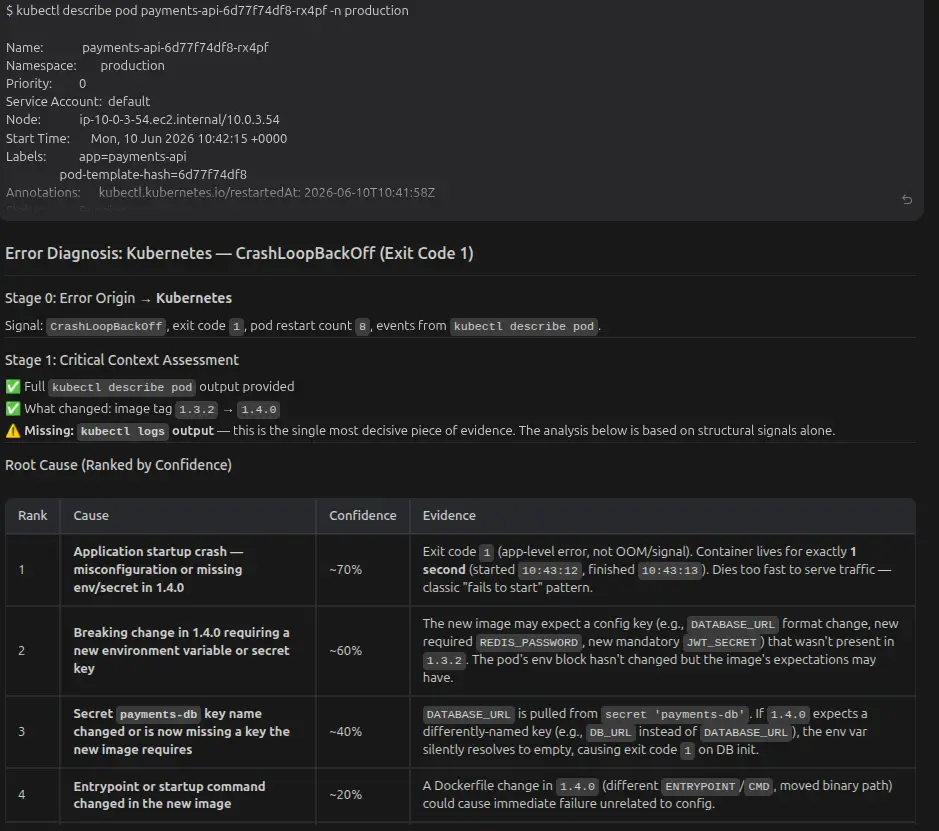
The single biggest thing that improved my results: treating Claude like a knowledgeable colleague who needs to be briefed, not a search engine. The skill enforces this by requiring full context before proceeding.
bash-auditor - Writing and Reviewing Bash Scripts
Bash is the lingua franca of DevOps and also one of the most footgun-prone languages in existence. A script that looks fine will silently fail because someone forgot set -e. A loop will do something destructive because the variable expansion wasn't quoted. A condition will always evaluate to true because of the way [[ ]] handles empty strings.
I use this skill for three things: Writing scripts from a plain-English description, reviewing scripts I didn't write, explaining what a script does, etc.
# My Prompt

Review this Bash script as if you're performing a production code review.

Identify:
- Bugs
- Security issues
- Reliability problems
- Quoting mistakes
- Error handling issues
- Race conditions
- Portability concerns
- Performance improvements

Explain why each issue matters and then provide a corrected production-ready version with comments.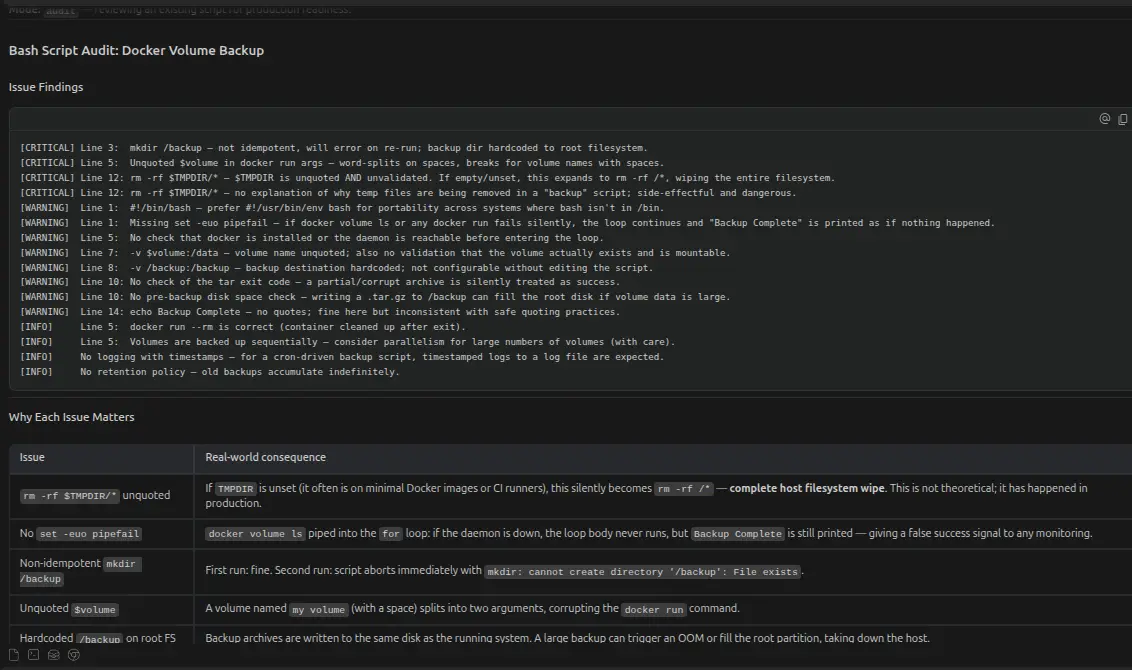
A note on trust: I always read through generated Bash before running it, especially anything that touches the filesystem or makes external requests. The skill produces a first draft with proper structure, not production-certified code.
k8s-manifest-reviewer - Understanding Kubernetes YAML
Kubernetes YAML is verbose by design. A single Deployment manifest can be 80 lines long and most of it is boilerplate. The meaningful parts, resource limits, liveness probes, affinity rules and security contexts are buried in the middle.
I use this skill in two ways:
Explaining what a manifest does: Paste in a Deployment or StatefulSet YAML I haven't seen before and the skill walks through it section by section, calling out anything non-obvious. Particularly useful when you inherit infrastructure and need to quickly understand what's running and why.
Spotting misconfigurations: The skill audits against a production-readiness checklist
# My prompt
Review this Kubernetes Deployment as if you're the platform engineer responsible for approving it for production.

Please:
1. Explain what each section of the manifest does.
2. Point out any security, reliability, scalability, or performance issues.
3. Identify Kubernetes best-practice violations.
4. Rank the issues by severity (Critical, High, Medium, Low).
5. Explain why each issue matters.
6. Suggest concrete fixes.
7. Provide a corrected production-ready manifest.

Context:
- This is running in a production EKS cluster.
- It was migrated from a development environment.
- Traffic is expected to reach 800-1000 requests per second.
- High availability is required.
- Zero-downtime deployments are expected.

Here's the manifest provided: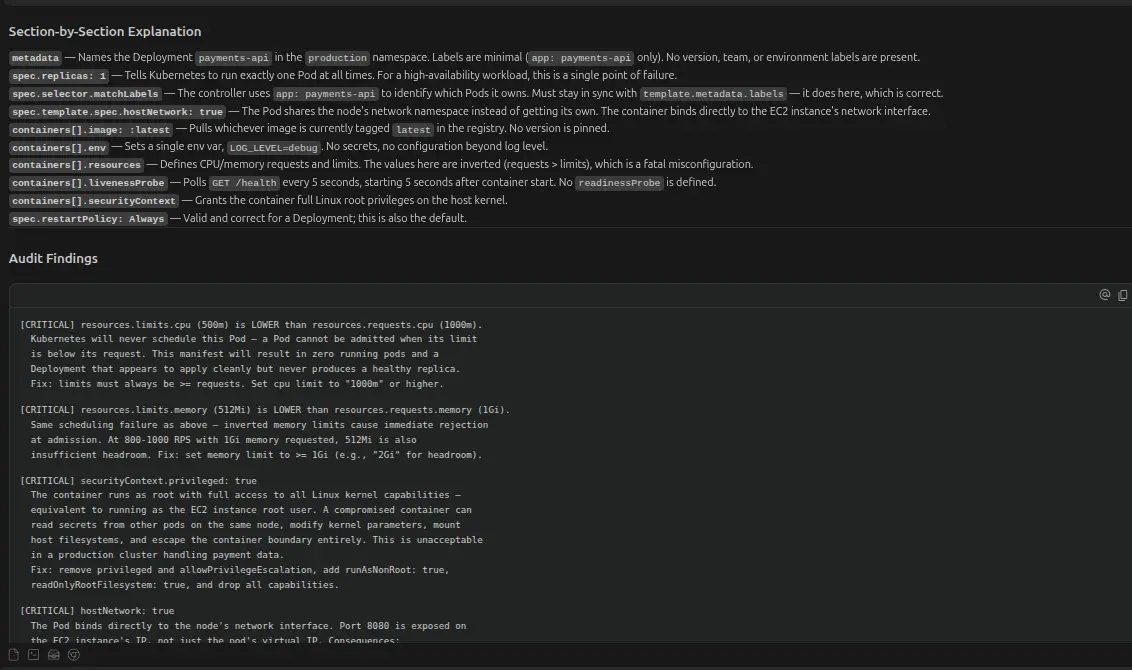
Things the skill catches that are easy to miss: Memory limit lower than memory request, missing readinessProbe, hostNetwork: true left in from a debugging session, :latest image tag in a production manifest, no podAntiAffinity rules, etc.
format-converter - Converting Between DevOps Formats
DevOps involves a lot of format conversion work that nobody talks about because it's unglamorous. Docker Compose files that need to become Helm charts. Bash scripts that need to become Ansible playbooks. cURL commands from API docs that need to become Python scripts. JSON that needs to become YAML.
All of this is mechanical but error-prone when you do it by hand.
The skill enforces that constraints are explicit before generating output. The more specific your constraints, the less cleanup you do afterwards.
runbook-drafter - Writing Operational Documentation
A runbook is only useful if it's actually written. Most teams have "runbooks" that are either a Confluence page last updated in 2021 or just "the person who knows how to restart the thing."
My process: do the thing first, then write a quick stream-of-consciousness description of what I did and why:
# My prompt

I just fixed a production database connectivity issue. Here's what happened:
the app pods were getting connection refused on port 5432, which turned out to
be a NetworkPolicy that was blocking traffic from the app namespace to the db
namespace after a recent namespace label change. I fixed it by updating the
namespaceSelector in the NetworkPolicy. Write a runbook section for this.The skill turns that stream-of-consciousness into a structured runbook section in about 30 seconds. I edit it, add the actual commands I ran, and it becomes something a teammate could actually follow at 2am.
The same approach works for postmortems. Dump the timeline, dump the actions, ask the skill to organize it into a postmortem structure. You still write the "lessons learned" section yourself; that's the part that requires judgment.
terraform-explainer - Understanding Infrastructure as Code
Terraform's HCL is readable enough on its own, but complex module structures - especially third-party modules with 40 variables, can be hard to parse quickly. I use this skill to understand infrastructure I didn't write.
Reading a module:
Explain what this Terraform module does. I specifically want to understand:
- What resources it creates
- What the required vs. optional variables are
- Whether anything here creates a public-facing resource
- Anything that might be surprising in a production AWS accountProvider APIs go stale. Terraform and cloud provider APIs evolve constantly. For anything version-sensitive, verify against the official registry before trusting the output.
api-tester - Generating cURL and API Test Commands
Every time I'm integrating a new service or debugging a webhook, I end up constructing cURL commands from API documentation. JWT auth headers, JSON body formatting, the right Content-Type; this is tedious and the skill is fast at it.
The prompt I put:
Give me a cURL command to call the GitHub REST API to list all open pull
requests for the repo "myorg/myrepo", authenticated with a personal access
token stored in $GITHUB_TOKEN, with output formatted as JSON and piped to jq
to show only the PR title and number.The skill knows the auth patterns for common APIs (GitHub, Slack, Prometheus, Alertmanager, PagerDuty) without needing to be told. It also enforces that credentials are always environment variables and generated commands never contain a literal token.
I use this for any API I haven't touched before: Prometheus remote write, Alertmanager webhooks, AWS API Gateway, Slack, PagerDuty, wherever I need a quick working example to start from.
cicd-auditor - Reviewing CI/CD Pipeline Configs
CI/CD pipelines written in YAML accumulate complexity over time. Stages that nobody remembers the purpose of. Jobs that run sequentially because nobody added needs: correctly. Secrets being printed to logs somewhere. Docker layers not being cached.
My review prompt:
Review this GitHub Actions workflow for common issues:
- Steps that could be parallelized but aren't
- Secrets being exposed in logs
- Missing caching for dependencies or Docker layers
- Jobs that will always run even when they should be conditional
- Third-party actions not pinned to a SHA
The skill specifically checks for something that most miss: third-party GitHub Actions pinned to mutable tags. uses: some-action/tool@v3 looks fine, but it can be hijacked; the tag can be moved to point at different code. The safe version is pinning to a commit SHA.
Wrapping Up
The value I get from Claude in a DevOps context is concentrated in specific places: decoding errors faster, auditing configs I didn't write, handling format conversion that's mechanical but annoying, and getting documentation drafted while the context is fresh. You can refer the official documentation for Claude skills.
The skills are what make this reliable instead of hit-or-miss. Without them, Claude gives you general advice. With them, it follows a deterministic workflow - asks for the right inputs, applies a consistent checklist, and formats the output in a way you can actually act on.
If you have more such skill.md that you use, share them in the comments and tell how these skills enhance your workflow!