There are plenty of tools that help you use Docker containers more effectively and smoothly. One of the most popular was Watchtower. Was...because the project has been discontinued in December 2025.
If you've been running Watchtower to automatically keep your containers updated, you're not alone in suddenly wondering what's next after the repo has been archived.

Good news - the alternatives are actually better. Here are some solid tools worth your time in my opinion and experience.
Diun - Docker Image Update Notifier

It is a CLI application written in Go and delivered as a single executable (and a Docker image) to receive notifications when a Docker image is updated on a Docker registry.
Diun does one thing: watches your images and notifies you when they're updated. It will not touch your containers. That's intentional. If you've ever had Watchtower silently pull a Postgres major version upgrade at 2 am, you'll appreciate this approach. You stay in control of when the actual update happens.
Quick compose setup:
services:
  diun:
    image: crazymax/diun:latest
    volumes:
      - "./data:/data"
      - "/var/run/docker.sock:/var/run/docker.sock"
      - "./diun.yml:/diun.yml:ro"
    environment:
      - "DIUN_WATCH_SCHEDULE=0 */6 * * *"
    restart: always
and make one diun.yml:
# diun.yml
watch:
  schedule: "0 */6 * * *"
providers:
  docker:
    watchStopped: true
notif:
  discord:
    webhookURL: https://discordapp.com/api/YOUR/WEBHOOK
You can mention your webhook URL for Slack, Telegram, Discord, etc. if there is any update, you will receive it like:
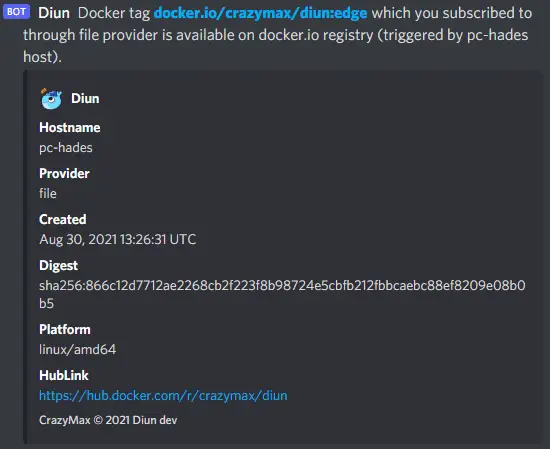
This will notify you in all supported applications, just like what we have received on Discord: the hostname, provider, the date it was created, platform and the Docker Hub link.
Use this if: You want awareness without the risk of surprise updates. Great for production-adjacent setups.
Tugtainer

Tugtainer is a self-hosted app for automating updates of your Docker containers. Relatively new (October 2025), devs say not production-ready yet. But moves fast — v1.25.0 dropped March 2026.
Tugtainer gives you a proper web dashboard to manage container updates. Think Portainer, but focused specifically on the update workflow.
Quick setup:
# create volume
docker volume create tugtainer_data

# pull image
docker pull ghcr.io/quenary/tugtainer:1

# run container
docker run -d -p 9412:80 \
    --name=tugtainer \
    --restart=unless-stopped \
    -v tugtainer_data:/tugtainer \
    -v /var/run/docker.sock:/var/run/docker.sock:ro \
    ghcr.io/quenary/tugtainer:1
Hit http://your-server:3000 and you get this:
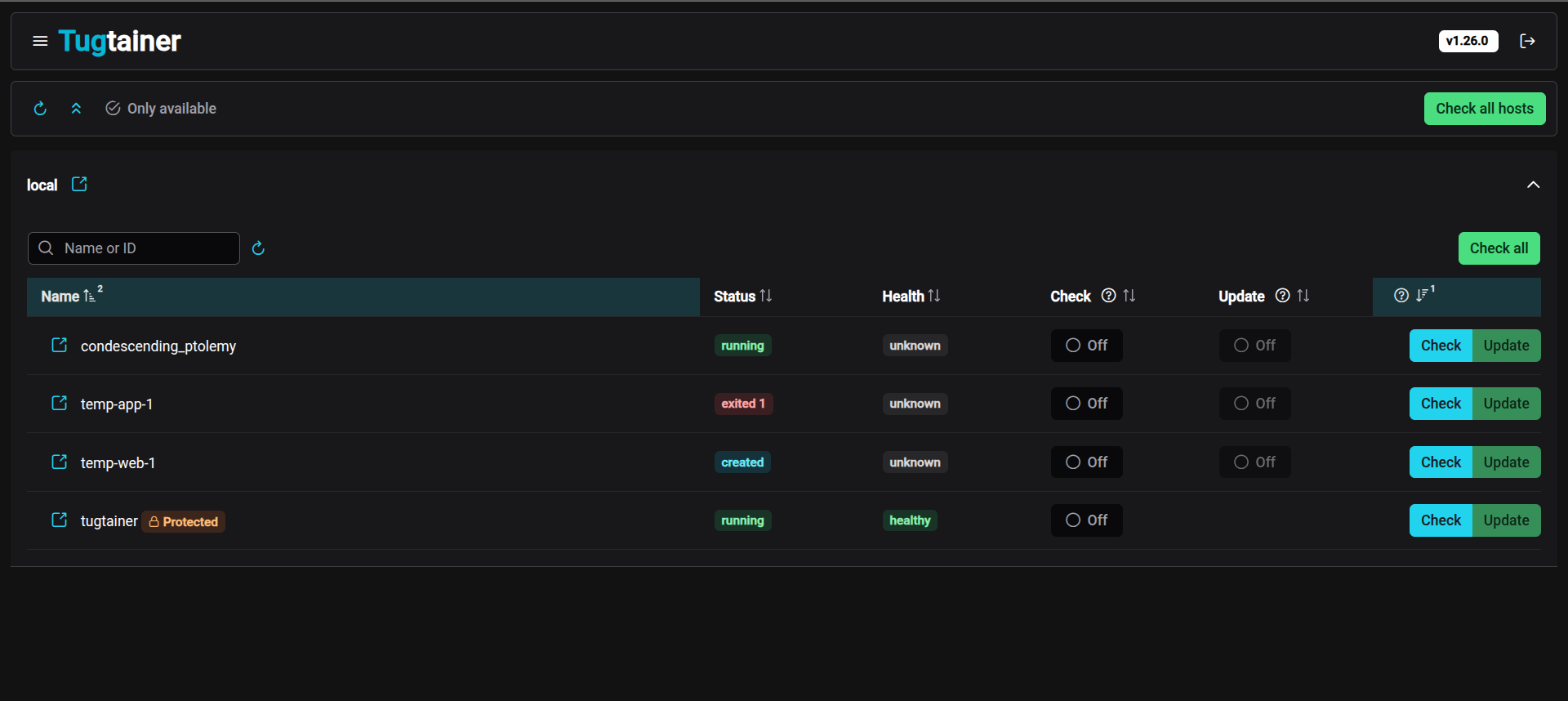
Some of the main features are: Notifications to a wide range of services, Per-container config (check only or auto-update), Automatic/manual check and update, Automatic/manual image pruning and Linked containers support (compose and custom).
Use this if: You want a UI to manage your homelab updates. Especially good for Docker Compose setups.
WUD - What's Up Docker

WUD is the closest thing to a drop-in Watchtower replacement - but it's smarter. It has a web dashboard, notification support, and can auto-update containers. The key difference? It lets you set thresholds.
WUD_TRIGGER_DOCKER_LOCAL_THRESHOLD=patch
With that set, WUD auto-updates 1.2.3 → 1.2.4 but just notifies you for 1.2.3 → 1.3.0 or a major bump. Watchtower had no concept of this.
Quick setup:
services:
  wud:
    image: getwud/wud:latest
    ports:
      - "3000:3000"
    volumes:
      - /var/run/docker.sock:/var/run/docker.sock
    environment:
      - WUD_NOTIFIER_TELEGRAM_BOTTOKEN=your-token
      - WUD_NOTIFIER_TELEGRAM_CHATID=your-chat-id
      - WUD_TRIGGER_DOCKER_LOCAL_THRESHOLD=patch
    restart: unless-stopped
If you hit localhost:3000 you will get a simple, minimalist UI.
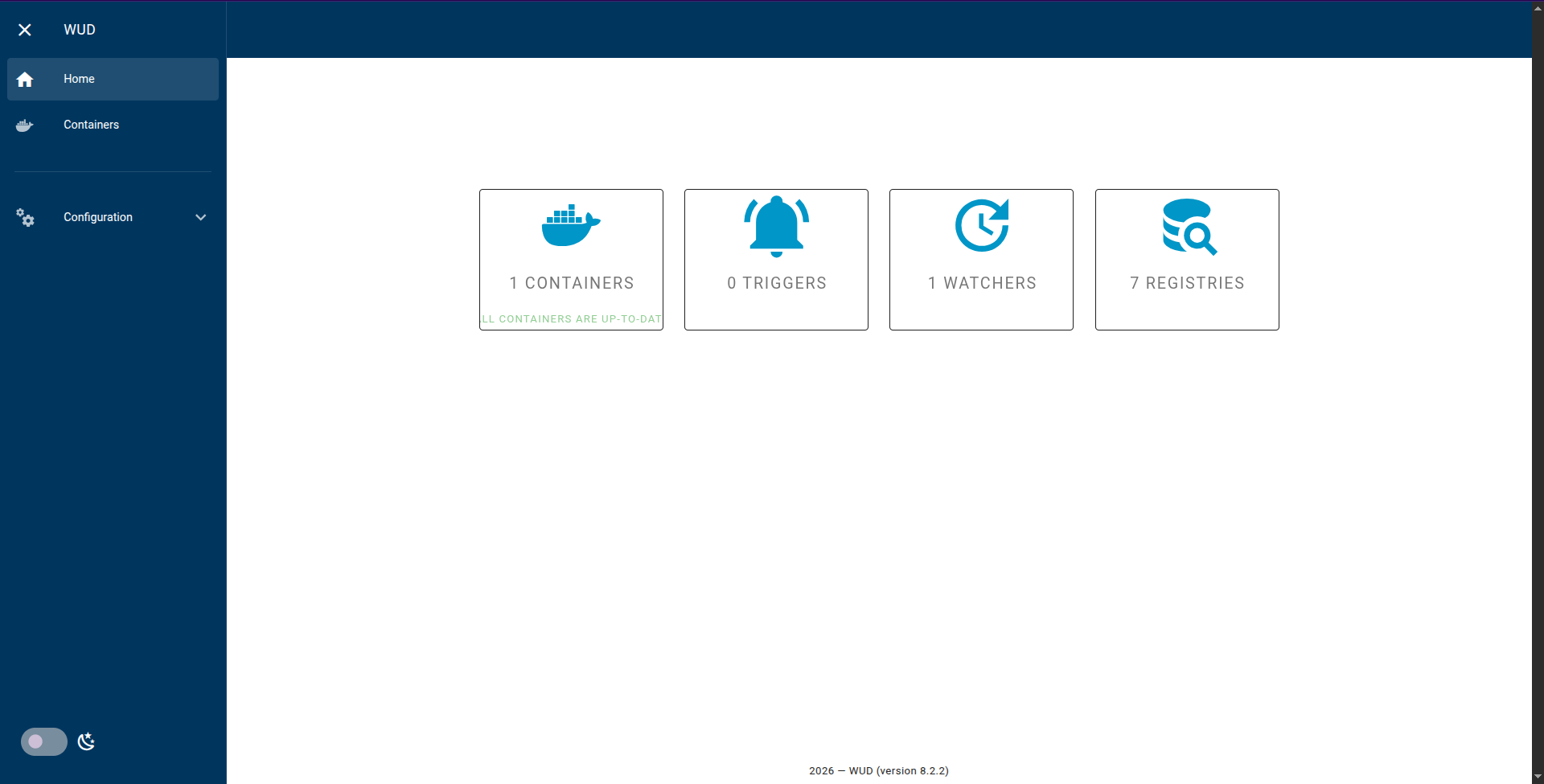
Notifications go to Slack, Telegram, Discord, Gotify, Ntfy, Pushover, email and more.
Use this if: You want something close to Watchtower's auto-update behavior, but with actual guardrails and a dashboard.
dockcheck
The odd one out - it's a bash script. And it's my personal favorite.
The trick: dockcheck uses regctl to compare image digests directly against the registry. It never pre-pulls images just to check for updates. Saves bandwidth, doesn't hit Docker Hub rate limits, and is just plain faster.
Install regctl first:
curl -L https://github.com/regclient/regclient/releases/latest/download/regctl-linux-amd64 \
  -o /usr/local/bin/regctl && chmod +x /usr/local/bin/regctl
curl -fsSL https://raw.githubusercontent.com/mag37/dockcheck/main/dockcheck.sh -o dockcheck.sh
chmod +x dockcheck.sh
./dockcheck.shYou will get output like this:
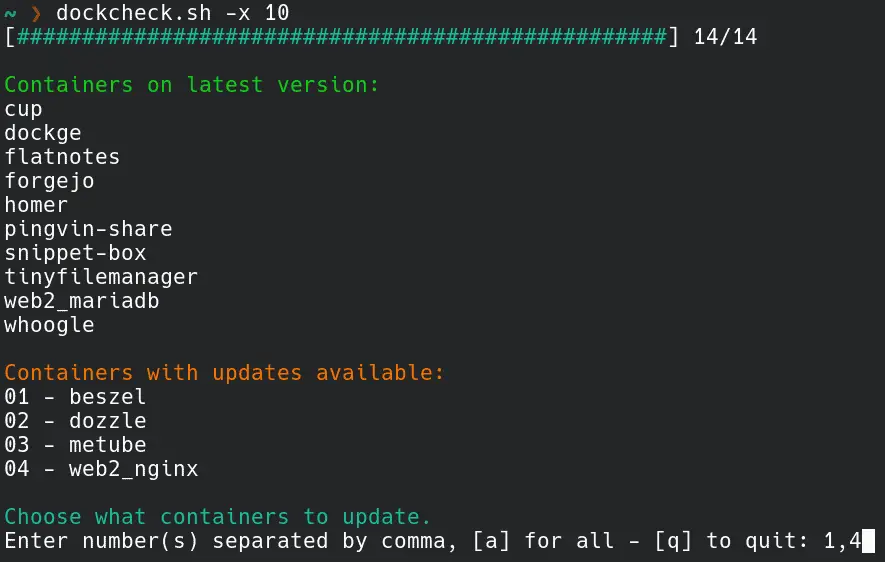
You get a numbered list of containers with updates available. Pick which ones to update, or type a for all. Clean and simple.
To automate it, just cron it:
# Every Sunday at 3AM, auto-update all, send notification
0 3 * * 0 /home/user/dockcheck.sh -a -n >> /var/log/dockcheck.log 2>&1
It also supports image backups -b so you can roll back if something breaks, and parallel checks with -x N, for more flag you can check -h flag for help.
Use this if: You're comfortable with the terminal, run a Linux homelab, and want something lightweight and auditable (it's a bash script, you can read the whole thing).
Cup

Cup might be the fastest update checker on this list. It claims to scan 58 images in 3.7 seconds on a Raspberry Pi 5!
The secret is that instead of pulling images to compare them, it makes minimal API calls - one auth request per registry, then lightweight manifest HEAD requests. This means it never burns through Docker Hub's pull rate limits, which matters a lot now that Docker Hub has been tightening limits for unauthenticated users.
Quick setup:
#Pull the image
docker pull ghcr.io/sergi0g/cup

#Run the image with port mapping
docker run -tv /var/run/docker.sock:/var/run/docker.sock -p 9001:9001 ghcr.io/sergi0g/cup serve -p 9001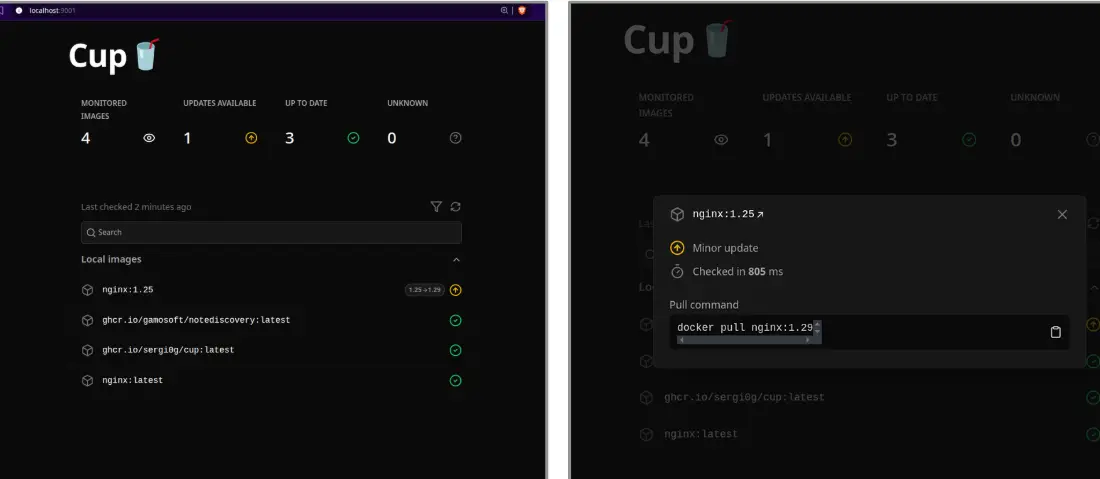
Then, if you visit localhost:9001 you will get a simple look where you will see all the monitored images, updates available and up-to-date images with a command given to update to the latest image.
It tells you what's out of date and leaves the rest to you - via a cron job, a webhook consumer, or just checking the dashboard manually. It supports Docker Hub, ghcr.io, Quay, lscr.io, Gitea and more.
Use this if: You're hitting Docker Hub rate limits with other tools, or just want the fastest possible update check without anything auto-touching your containers.
Dockwatch
Simple UI driven way to manage updates & notifications for Docker containers. Dockwatch comes from the Notifiarr team; the same folks who built one of the best notification routing systems in the self-hosted world. That DNA shows.
It's built around a beautiful web UI and a genuinely impressive notification system. The kind of thing you'd show someone to convince them that self-hosting is actually fun.
Quick compose setup:
services:
  dockwatch:
    image: ghcr.io/notifiarr/dockwatch:latest
    ports:
      - "3001:80"
    volumes:
      - /var/run/docker.sock:/var/run/docker.sock
      - ./dockwatch/config:/config
    restart: unless-stopped
Once you're done, run the command:
docker compose up -d
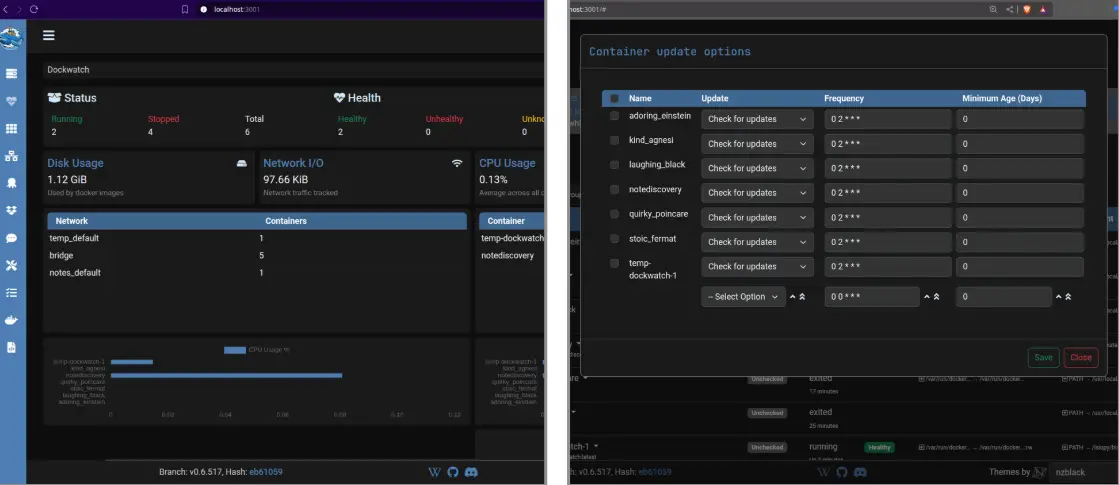
Then visit the localhost:3001, you will see the advanced setup, which shows a beautiful UI giving you information about disk usage, network I/O, CPU usage, memory usage and updates available for the images.
Use this if: You want a feature-rich dashboard with serious notification chops, especially if you're already in the Notifiarr/Servarr ecosystem.
nicholas-fedor/watchtower

For Those Who Don't Want to Change Anything. Okay, real talk. Maybe you've been running Watchtower for years. Your whole homelab is tuned around it. Your cron jobs reference it. Your muscle memory knows the flags. You don't want to learn a new tool.
Fair. Enter nicholas-fedor/watchtower - a community-maintained fork that picks up exactly where the archived original left off.
# Before (archived, no longer works on newer Docker versions):
image: containrrr/watchtower

# After (actively maintained):
image: nickfedor/watchtower
Quick setup:
# Get the compose file
curl -L https://raw.githubusercontent.com/nicholas-fedor/watchtower/refs/heads/main/examples/default/docker-compose.yaml -o docker-compose.yaml

# Run command
docker compose up -d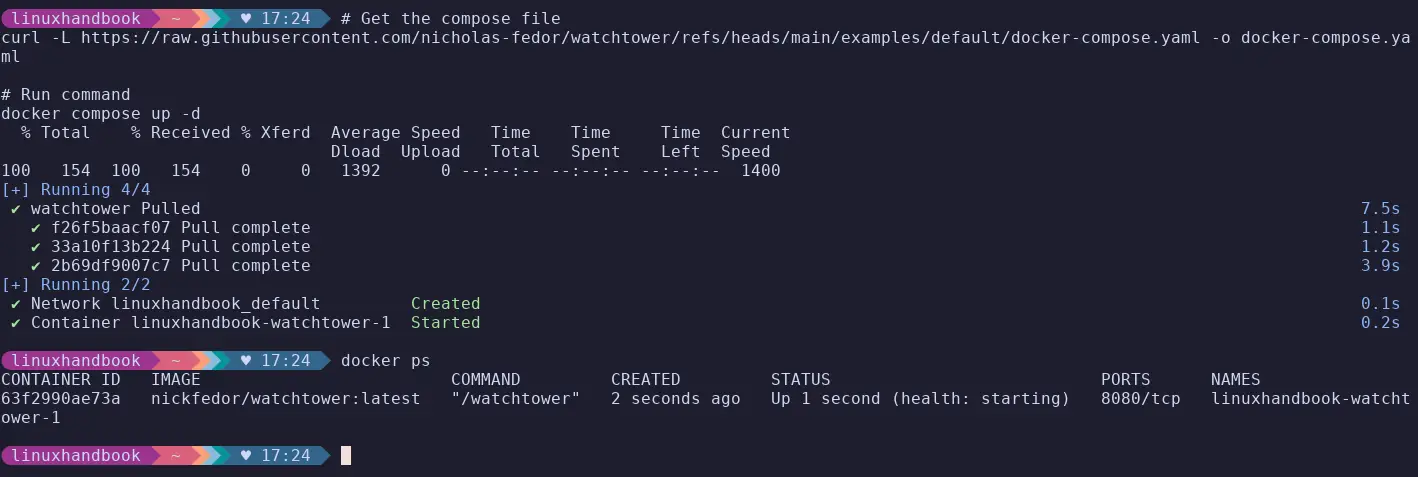
After this, the expected behaviour is it will monitor all running containers on the host and every 24 hours, it will poll if the monitored containers have updated image digests; if available, it will pull the updated image without changing the previous configurations.
auto-updates everything it can see, by default. There's no semantic versioning awareness, no dashboard, no diff before it updates
Use this if: You want zero migration friction and just need the original Watchtower to keep running on modern Docker.
So, which one to choose?
Yes, if you are impressed with all of these here, I will give you one line suggestions:
Want notification-only, no auto-updates - Diun or Cup, Want a web UI for your homelab - Tugtainer or WUD or Dockwatch, Closest Watchtower replacement with smarter auto-updates - WUD, Terminal-first, minimal dependencies - dockcheck, Running Kubernetes or Swarm - Only Diun supports that, Want zero migration from the original Watchtower - nicholas-fedor/watchtower, Already in the Notifiarr/Servarr ecosystem - Dockwatch is a natural fit.
Know another tool worth adding? Drop it in the comments.